
Online shoppers want more than a few flat product photos. They want to understand what a product looks like from different angles, see its details, and feel confident before making a purchase. An interactive 3D product viewer for websites can make this possible by allowing visitors to rotate, zoom, and explore a product directly on a webpage.
Instead of showing customers only the front, back, or side of a product, an interactive viewer gives them a more complete digital view. This can be especially useful for furniture, electronics, consumer products, machinery, accessories, home goods, and other items where shape and design matter.
Interactive 3D viewing is also becoming an important part of modern e-commerce. It can help businesses present products in a more engaging way while giving customers more information before they buy. When combined with accurate 3D product modeling, a website can offer a much richer product experience.
What Is an Interactive 3D Product Viewer?
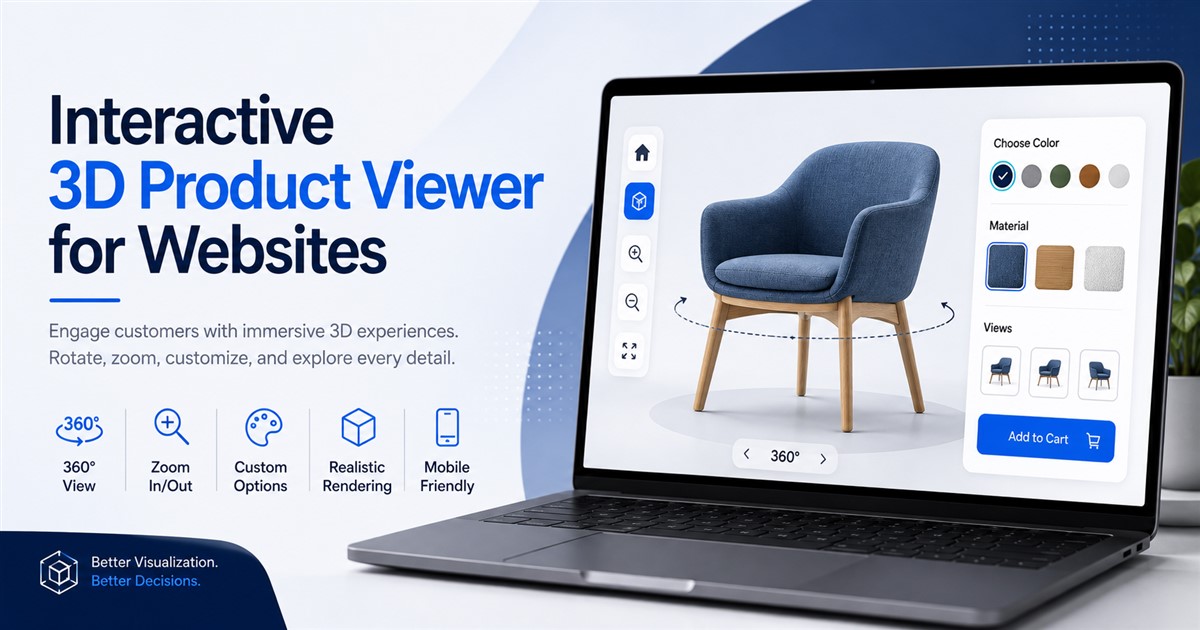
An interactive 3D product viewer is a website feature that lets users explore a digital 3D model of a product. Instead of looking at a single static image, visitors can interact with the model using their mouse, touch screen, or other controls.
Depending on the viewer and model, customers may be able to:
- Rotate the product around different angles
- Zoom in to inspect small details
- Zoom out to see the complete product
- View the product from the top, front, side, or back
- Change colors or materials
- Explore different product configurations
- View product components or features
This creates a more hands-on experience than traditional product photography. Customers can spend time exploring the product before deciding whether it is right for them.
Why Do Websites Need Interactive Product Viewers?
Buying products online can sometimes be difficult because customers cannot physically touch or examine the item. Photos help, but they may not show every important detail.
A 3D viewer can reduce this limitation by giving visitors greater control over how they view the product. For example, someone shopping for a chair may want to check the shape of the back, the legs, the armrests, and the overall proportions. A standard photo may not show all of these details clearly.
With an interactive model, the customer can rotate the chair and inspect it from different directions.
This approach can be useful for many types of businesses, including:
| Business Type | How a 3D Viewer Can Help |
|---|---|
| Furniture | Show shape, size, design, and different finishes. |
| Electronics | Let customers inspect ports, buttons, screens, and body design. |
| Jewelry | Show small details, shapes, stones, and materials from multiple angles. |
| Home Products | Help shoppers understand product form and appearance. |
| Industrial Products | Present complex equipment and components more clearly. |
| Automotive | Display vehicle parts, accessories, and design details. |
How an Interactive 3D Product Viewer Works
The process usually starts with a detailed 3D model. The model can be created from product drawings, CAD files, photographs, measurements, scans, or other reference materials.
Once the model is ready, it can be prepared for web use. This step is important because a model designed for high-end rendering may contain too much data for a website. A web-ready model needs to provide a good balance between visual quality and performance.
The basic process looks like this:
- Create the 3D model: Build an accurate digital version of the product.
- Add materials: Apply suitable colors, textures, finishes, and surface details.
- Optimize the model: Reduce unnecessary data while maintaining good visual quality.
- Prepare the viewer: Connect the model to an interactive web viewer.
- Add controls: Enable rotation, zoom, configuration, or other useful functions.
- Test the experience: Check loading speed, mobile performance, and user interaction.
- Publish it: Add the viewer to the product page or another part of the website.
Key Features of an Interactive 3D Product Viewer
1. 360-Degree Product Rotation
Rotation is one of the most useful features of a 3D viewer. Visitors can drag the model to see it from different angles. This can provide a better understanding of the product’s shape and construction.
2. Zoom Controls
Zoom allows customers to inspect details that may be difficult to see in normal product images. This can be useful for textures, finishes, buttons, connectors, patterns, and other small features.
3. Color and Material Selection
Some interactive viewers allow customers to change product colors or materials. For example, a furniture website could let shoppers switch between different wood finishes or fabric colors without opening separate product pages.
4. Product Configuration
More advanced viewers can allow visitors to configure products. A customer might choose a size, color, component, material, or design option and immediately see the result.
This type of experience is often called a 3D product configurator. It can be especially valuable for products with many variations.
5. Mobile Interaction
A modern viewer should work well on phones and tablets. Users should be able to rotate and zoom the product using touch gestures without struggling with complicated controls.
Benefits of Using a 3D Product Viewer on a Website
Better Product Understanding
Customers can see more of the product before purchasing. This may help them understand its shape, design, and features better than a small set of static images.
More Engaging Shopping Experience
Interactive content encourages visitors to actively explore a product. Instead of simply scrolling through photographs, users can interact with the model.
Supports Product Visualization
3D models can help businesses present products that are difficult to photograph from every angle. This is particularly useful for complex products with detailed shapes.
Useful for Product Variations
One 3D model can sometimes support several colors, finishes, or configurations. This can make it easier to present different product options in one interactive experience.
Supports E-Commerce Marketing
Interactive product content can become an important part of an e-commerce product page. It can work alongside product photos, descriptions, specifications, videos, reviews, and other information.
For businesses selling online, it is also worth understanding how 3D product modeling for e-commerce can be used across different parts of the customer journey.
Interactive 3D Viewer vs. Traditional Product Photos
3D viewers do not necessarily need to replace product photography. In many cases, the best approach is to use both.
| Feature | Product Photos | Interactive 3D Viewer |
|---|---|---|
| Multiple angles | Requires several images | Users can rotate the model |
| Zooming | Depends on image resolution | Can provide interactive inspection |
| Product variations | Usually requires separate images | Can support interactive variations |
| Customer interaction | Limited | High |
| Product presentation | Static | Interactive |
For a deeper comparison, businesses can also explore the differences between 3D product models and product photography before deciding how to present their products online.
How to Create a 3D Product Viewer for Your Website
Creating a good viewer involves more than simply uploading a 3D file. The model, materials, file size, viewer technology, and website all need to work together.
Step 1: Start With Accurate Product References
Provide the modeling team with useful references. These may include CAD files, technical drawings, dimensions, product photographs, sketches, or physical measurements.
The more accurate the references are, the easier it is to create a reliable model.
Step 2: Build the 3D Product Model
The product is modeled using suitable 3D software. The modeling method depends on the product. Technical products may require precise CAD-based modeling, while consumer products may need detailed surface modeling.
If the project begins with engineering drawings or technical plans, professional CAD drafting services can also be useful for creating accurate digital references.
Step 3: Add Materials and Textures
Materials make the model look more realistic. Wood, glass, metal, plastic, fabric, leather, and other surfaces each have different visual properties.
Good material work helps users understand how the real product may look.
Step 4: Optimize the Model for the Web
This is one of the most important steps. A highly detailed model can become very large and may load slowly on a website.
The model should therefore be optimized without making it look noticeably worse. File size, polygon count, textures, lighting, and other elements should be considered.
Step 5: Add the Interactive Viewer
The optimized model is connected to a web-based viewer. The viewer provides the controls that visitors use to rotate, zoom, and interact with the product.
Step 6: Test on Different Devices
Testing should cover desktop computers, tablets, and smartphones. The viewer should be easy to use and should not create unnecessary problems for website visitors.
Tips for Making a 3D Viewer User-Friendly
A 3D viewer should make shopping easier, not harder. Keep the interface simple and give users clear controls.
- Use simple rotation and zoom controls.
- Make the viewer responsive on mobile devices.
- Keep the model optimized for fast loading.
- Use realistic but efficient textures.
- Provide product information next to the viewer.
- Allow users to return to the default view.
- Show important product features clearly.
- Test the viewer with real users when possible.
Common Mistakes to Avoid
Using an Unoptimized Model
A model that is too large can slow down the page. This can create a poor user experience, especially for visitors using mobile devices or slower internet connections.
Ignoring Mobile Users
A website may look excellent on a desktop but still provide a poor experience on a phone. Since many online shoppers use mobile devices, mobile testing is essential.
Making the Viewer Too Complicated
Customers should understand how to use the viewer quickly. Too many buttons and complicated controls can make the experience confusing.
Focusing Only on Appearance
A beautiful model is useful, but accuracy and performance also matter. The model should represent the product correctly and load efficiently.
How 3D Viewers Can Support Online Sales
A 3D viewer cannot guarantee more sales by itself. However, it can improve the way customers interact with product information.
When shoppers can explore a product from different angles, they may gain a clearer understanding of what they are buying. This can help build confidence, especially for products where shape, size, or design is important.
Businesses interested in using 3D visualization for e-commerce can also learn more about how 3D product visualization can support sales.
Who Should Use an Interactive 3D Product Viewer?
An interactive viewer can be useful for many businesses, but it may provide the most value when the physical design of a product is an important part of the buying decision.
| Industry | Potential Use |
|---|---|
| Furniture | Explore chairs, tables, sofas, beds, and cabinets. |
| Consumer Electronics | Inspect product bodies, screens, buttons, and ports. |
| Home Decor | Show decorative products from multiple angles. |
| Industrial Equipment | Present machines and technical components. |
| Automotive | Display parts, accessories, and vehicle components. |
| Fashion Accessories | Present bags, watches, shoes, and other products interactively. |
What Makes a Good 3D Product Model?
A good interactive experience starts with a good 3D model. The model should be accurate, visually appealing, properly scaled, and optimized for its intended use.
For web-based use, the model also needs to balance quality and performance. Adding unnecessary geometry or very large textures may increase loading time without providing a noticeable visual improvement.
Businesses should also think about where the model will be used. A model created for an interactive website may have different technical requirements from a model created for an advertisement, product animation, game, or engineering application.
Final Thoughts
An interactive 3D product viewer for websites can turn a standard product page into a more engaging digital experience. Instead of asking customers to understand a product through a few static images, businesses can let them rotate, zoom, inspect, and sometimes configure the product themselves.
The key is to start with an accurate 3D model and prepare it correctly for the web. Performance, mobile usability, simple controls, realistic materials, and clear product information all contribute to a better experience.
For businesses planning to add interactive 3D content to their websites, professional 3D modeling can help create models that are both visually strong and suitable for the intended application. If you are ready to discuss a project, you can contact 3D Modeling Service with your product details and requirements.
Frequently Asked Questions
What is an interactive 3D product viewer?
An interactive 3D product viewer is a website feature that allows visitors to explore a digital product model. Users can usually rotate and zoom the model to see it from different angles.
Can a 3D viewer work on mobile devices?
Yes. A properly developed 3D viewer can work on smartphones and tablets. It should be optimized for touch controls and mobile performance.
Does a 3D product viewer replace product photography?
Not necessarily. Photos and 3D models can work together. Photos can show the product in real-world settings, while a 3D viewer allows users to explore the product interactively.
Can customers change product colors in a 3D viewer?
Yes. Depending on the viewer and model setup, customers can be given options to change colors, materials, finishes, or other product variations.
What type of products can use a 3D viewer?
Almost any product that can be represented digitally can potentially use a 3D viewer. Common examples include furniture, electronics, machinery, home products, automotive parts, accessories, and consumer goods.
Will a 3D viewer slow down my website?
It can if the 3D model and viewer are poorly optimized. Proper model optimization, efficient textures, suitable file formats, and performance testing can help keep loading times under control.
How much does an interactive 3D product viewer cost?
The cost depends on factors such as product complexity, modeling detail, number of products, materials, required interactions, configuration features, and technical requirements. A simple product viewer usually requires less work than a complex configurator with many options.
Can one 3D model be used for other marketing materials?
Yes. Depending on how the model is created, it may also be useful for product renders, animations, advertisements, presentations, e-commerce content, and other visual marketing materials.
How do I get started with a 3D product viewer?
Start by identifying the products you want to display and collecting available references such as CAD files, drawings, photographs, dimensions, and product specifications. Then discuss the required model quality, interactive features, website platform, and expected user experience with a professional 3D modeling team.