
Packaging is one of the first things customers notice when they see a product. Before they read the product description or learn about its features, they often notice the box, bottle, pouch, container, or other packaging. Because of this, good packaging design can play an important role in product marketing and sales.
Today, brands are using 3D packaging design and visualization to create better product presentations before packaging is physically produced. Instead of depending only on flat drawings or basic mockups, designers can create realistic digital versions of packages and see how they may look from different angles.
3D packaging visualization can be useful for product development, advertising, e-commerce, presentations, packaging reviews, and marketing campaigns. It can also help businesses find design problems earlier and make changes before spending money on physical samples.
This guide explains what 3D packaging design is, how the process works, its benefits, common uses, costs, and how businesses can get better results from their packaging visualization projects.
What Is 3D Packaging Design?
3D packaging design is the process of creating a digital three-dimensional version of product packaging. The digital model can represent the shape, size, material, colors, labels, graphics, and other details of the real package.
For example, a company selling cosmetics may need a 3D model of a bottle and its box. A food company may need a digital model of a pouch, can, jar, or carton. An electronics brand may need a model of its product box with printed graphics and internal packaging.
Once the model is created, designers can apply materials, textures, colors, labels, and lighting to make it look realistic. The final result can be used to create product renders, advertisements, website images, presentations, and other marketing materials.
| Packaging Element | What 3D Visualization Can Show |
|---|---|
| Shape | Shows the exact or planned form of the package. |
| Colors | Displays brand colors and different color options. |
| Labels | Shows logos, text, product information, and graphics. |
| Materials | Can represent plastic, glass, paper, metal, cardboard, and other surfaces. |
| Lighting | Helps create realistic product presentation images. |
Why Is 3D Packaging Visualization Important?
Traditional packaging design often starts with sketches, flat artwork, or technical drawings. These are useful, but they may not always show how the final package will look in the real world.
A 3D visualization gives designers and marketing teams a more complete view. They can see the package from the front, back, side, top, and other angles. They can also test different colors, materials, labels, and environments.
This can make the design review process easier because everyone involved can look at the same visual representation.
For brands, this can also reduce the need to create physical samples for every design variation. Digital versions can be changed much faster, allowing teams to compare different concepts before selecting the final design.
3D Packaging Design vs. Traditional Packaging Mockups
A traditional packaging mockup may be a flat drawing, printed sample, or simple physical prototype. These methods still have value, but 3D visualization provides more flexibility during the design and marketing stages.
| Factor | Traditional Mockup | 3D Packaging Visualization |
|---|---|---|
| Viewing angles | Usually limited | Can be viewed from many angles |
| Design changes | May require a new sample | Can often be changed digitally |
| Product variations | May require multiple samples | Multiple digital versions can be created |
| Marketing images | Requires photography or additional work | Can be rendered directly from the model |
| Pre-launch use | Depends on physical samples | Can be used before production |
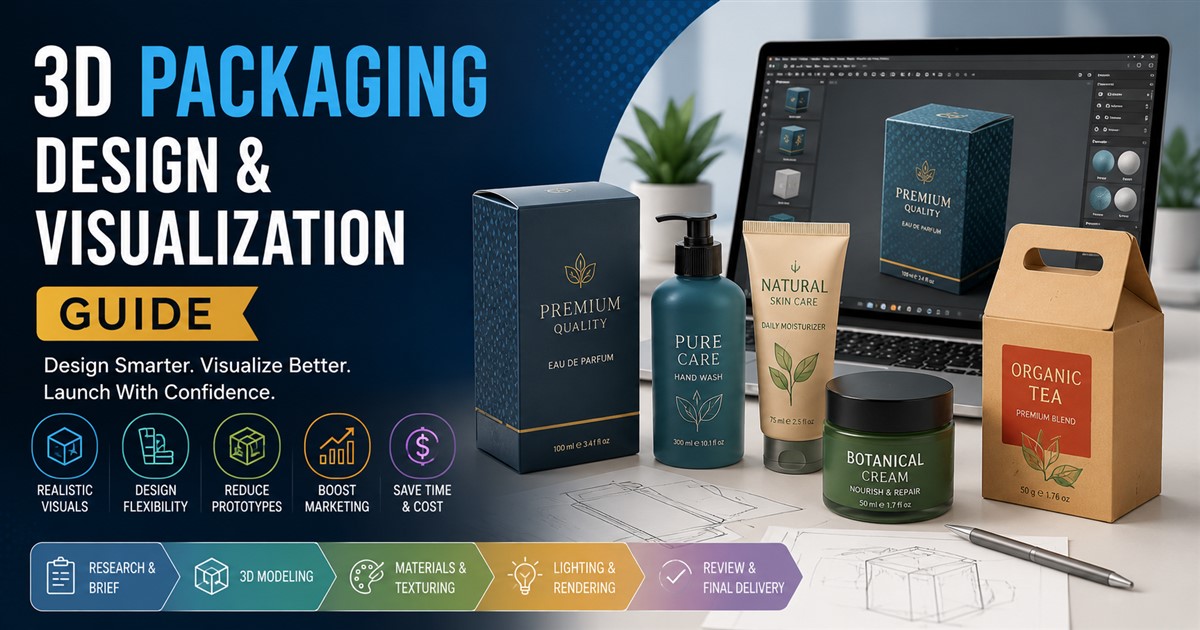
How the 3D Packaging Design Process Works
The exact workflow can vary depending on the packaging type and project requirements. However, most professional projects follow several basic stages.
1. Collecting Product and Packaging Information
The first step is to collect the information needed to build an accurate model. This may include packaging drawings, dimensions, sketches, CAD files, reference images, logos, label artwork, and material information.
The more accurate the source information is, the easier it is to create a reliable digital representation.
2. Creating the Basic 3D Shape
The designer then creates the basic structure of the package. This may include a bottle, carton, box, pouch, tube, jar, container, or another custom shape.
Dimensions are important at this stage because the model should represent the intended size and proportions of the final package.
3. Adding Details
After the main shape is complete, additional details can be added. These may include caps, lids, handles, folds, seams, edges, openings, embossed areas, or other packaging features.
Small details can make a large difference when the final model is used for close-up marketing images.
4. Applying Materials and Textures
Next, the designer applies materials and textures. A package made from cardboard should look different from one made from glass or glossy plastic.
Textures can also represent printed graphics, labels, patterns, surface finishes, and other visual elements.
5. Adding Branding and Artwork
The brand logo, product name, colors, graphics, instructions, and other artwork are placed on the digital package.
This stage is important because even a highly detailed 3D model may not look like the actual product without accurate packaging artwork.
6. Lighting and Rendering
Once the model is complete, lighting and camera settings are created. The designer can then produce realistic renders of the package.
Different lighting setups can create different moods. A clean studio setup may work well for an e-commerce product image, while a lifestyle environment may be better for advertising.
7. Review and Final Changes
The finished visuals are reviewed by the client or design team. Changes may be requested for colors, labels, materials, dimensions, lighting, camera angles, or other details.
After approval, the final images or 3D files can be delivered in the required formats.
Businesses that want to understand this type of production process in more detail can review this guide to the 3D modeling project workflow.
Types of Packaging That Can Be Visualized in 3D
Almost any type of packaging can be represented as a 3D digital model when the required design information is available.
| Packaging Type | Common Uses |
|---|---|
| Product boxes | Electronics, toys, cosmetics, food, and retail products |
| Bottles | Beverages, cosmetics, cleaning products, and personal care |
| Jars | Food, skincare, supplements, and beauty products |
| Pouches | Snacks, coffee, pet food, and household products |
| Tubes | Toothpaste, cosmetics, creams, and personal care products |
| Cans | Beverages, food, and industrial products |
| Custom packaging | Special products requiring unique shapes or structures |
Benefits of 3D Packaging Visualization
Better Design Review
One of the biggest benefits is that teams can see the proposed package more clearly. Instead of looking at a flat design, they can see a three-dimensional version that is closer to the final product.
Faster Design Changes
Digital models make it easier to test changes. A company can compare different colors, labels, finishes, and shapes without creating a completely new physical sample for every idea.
Reduced Need for Physical Samples
Physical samples can take time and money to produce. While physical prototypes may still be needed before manufacturing, 3D visualization can reduce the number of samples needed during early design and marketing stages.
Better Marketing Content
High-quality 3D renders can be used to create attractive product visuals. They can be placed on websites, online stores, catalogs, social media posts, advertisements, and presentations.
Useful Before Production
A company does not always need to wait until the final packaging is manufactured to begin marketing. Once an accurate digital model is ready, the brand can start creating promotional content.
Using 3D Packaging Models for E-Commerce
E-commerce is one of the areas where 3D packaging visualization can be especially useful. Customers cannot physically hold a product before buying it online, so product images have to provide as much useful information as possible.
3D models can create clear product views from different angles. Brands can also use the models to create lifestyle scenes, close-up images, product comparisons, and interactive experiences.
Businesses selling products online can learn more about using digital assets effectively through this guide to 3D product modeling for e-commerce.
Using 3D Packaging for Product Marketing
Packaging is not only a protective layer around a product. It is also a marketing tool. The colors, shape, graphics, and materials can influence how customers view a brand.
3D packaging models allow marketers to create professional visuals without arranging a physical photo shoot for every concept.
A digital package can be placed on a table, inside a store, in a kitchen, in a bathroom, or in another environment that matches the product. Marketers can also create dramatic lighting or close-up shots to highlight packaging details.
For more ideas on how digital models can support promotional campaigns, see this guide on using 3D models in marketing.
Creating Different Packaging Versions
Many brands sell the same product in different sizes, flavors, colors, or packaging designs. Creating every version as a separate physical sample can become expensive and time-consuming.
With a digital workflow, a base 3D model can often be adapted for different variations.
| Variation | Example |
|---|---|
| Color | Black, white, red, green, or other brand colors |
| Size | Small, medium, and large packaging |
| Product version | Different flavors, models, or product types |
| Label | Different languages, markets, or product information |
| Finish | Glossy, matte, metallic, or textured surfaces |
3D Packaging Visualization for Product Launches
New product launches often require marketing content before the product reaches stores. This creates a challenge when physical packaging samples are not ready.
3D visualization can help brands prepare content earlier. Once the packaging design is approved, a digital model can be created and used for website graphics, advertisements, presentations, social media posts, online listings, and promotional materials.
This can give marketing teams more time to prepare campaigns and coordinate launch activities.
3D Packaging Renders for Advertising
Advertising often needs more creative visuals than standard product listings. A 3D packaging model gives designers more control over the scene.
For example, a beverage package could be shown surrounded by ice and water droplets. A cosmetic bottle could be placed in a luxury environment. A food package could be shown with ingredients around it.
These scenes can be created digitally without needing to build the entire physical setup.
The same model can also be rendered in different sizes for different advertising platforms. This can make it easier to reuse packaging assets throughout a campaign.
What Makes a Good 3D Packaging Model?
A good packaging model should do more than look attractive. It should represent the product accurately and meet the needs of the project.
- Accurate dimensions: The model should match the planned packaging size and proportions.
- Correct materials: Surfaces should look realistic and match the intended material.
- Accurate artwork: Logos, labels, text, and graphics should be positioned correctly.
- Good lighting: Lighting should help show the package clearly.
- Clean modeling: The model should have a professional and polished appearance.
- Suitable file formats: Final files should work with the intended software or marketing platform.
How Much Does 3D Packaging Design Cost?
There is no single price for every 3D packaging project. The cost depends on the complexity of the package and the final result required.
A simple box with basic artwork may be relatively straightforward. A complex bottle with curved surfaces, transparent materials, detailed labels, special finishes, and multiple variations will usually require more work.
Other factors may include the quality of the render, number of views, animation requirements, revisions, source files, project deadline, and number of packaging variations.
Businesses should consider the total project requirements when requesting a quote rather than looking only at the modeling stage.
Common Mistakes to Avoid
Using Poor Reference Materials
Incomplete drawings or unclear reference images can make it harder to create an accurate model. Brands should provide as much useful information as possible at the beginning.
Ignoring the Final Use
A model created for a website may have different requirements from one created for a high-resolution billboard or animation. The final purpose should be discussed before production begins.
Focusing Only on Appearance
A model can look attractive but still contain incorrect dimensions or packaging details. Accuracy is important when the model is based on a real product.
Not Planning for Different Outputs
If a company plans to use the model for websites, advertisements, social media, and presentations, these requirements should be considered from the start.
How to Choose a 3D Packaging Design Service
Choosing the right 3D artist or service provider can have a major effect on the final result. Businesses should look at previous work, modeling quality, communication, turnaround time, revision policies, and the ability to handle the required file formats.
It is also useful to ask how the provider handles reference materials, quality checks, revisions, and final delivery. Businesses can review this guide to choosing a 3D modeling service provider before starting a project.
A clear project brief can also reduce confusion. The brief should explain the packaging type, dimensions, desired materials, artwork, number of variations, final image sizes, file formats, and intended use.
Frequently Asked Questions
What is 3D packaging visualization?
3D packaging visualization is the process of creating a realistic digital representation of product packaging. It can show the package shape, materials, colors, labels, graphics, and other details from different angles.
Why do brands use 3D packaging models?
Brands use 3D packaging models to review designs, create marketing images, prepare product launch content, show packaging variations, and present products before physical samples are available.
Can 3D packaging models be used for e-commerce?
Yes. 3D packaging models can be used to create product images, different viewing angles, lifestyle renders, interactive experiences, and other visual content for online stores.
Can packaging be changed after a 3D model is created?
Yes. Depending on how the model was created, designers can update colors, labels, materials, dimensions, and other elements. This makes digital models useful when packaging designs go through several revisions.
Can 3D packaging visualization replace physical prototypes?
It can reduce the need for physical prototypes during early design and marketing stages, but it does not always replace them completely. Physical samples may still be needed to test the actual packaging, materials, printing, fit, and manufacturing quality.
What files are needed for 3D packaging modeling?
Useful files may include CAD drawings, packaging dimensions, sketches, product photographs, label artwork, logos, material references, and other technical information. The exact requirements depend on the packaging project.
How long does 3D packaging modeling take?
The timeline depends on the complexity of the package, level of detail, number of variations, number of renders, revisions, and project requirements. A simple package can take less time than a detailed custom package with multiple versions and animations.
Final Thoughts
3D packaging design and visualization give brands a practical way to see, improve, and market packaging before or alongside physical production. Instead of relying only on flat drawings or physical samples, businesses can create realistic digital versions that can be reviewed from many angles.
The benefits go beyond design approval. A well-made packaging model can become a useful marketing asset for product images, e-commerce listings, advertisements, social media content, presentations, product launches, and interactive experiences.
For brands with multiple products or packaging variations, the value can be even greater because digital models can often be adapted for different versions and campaigns.
The key is to plan the project carefully. Businesses should provide accurate reference information, define how the model will be used, choose the right level of detail, and work with a provider that understands both 3D modeling and visual presentation.
When used correctly, 3D packaging visualization can help brands present products more clearly, reduce unnecessary design work, and create stronger visual content for today’s digital marketplace.