
3D product rendering is now a popular way for businesses to create realistic product images without depending completely on traditional photography. From e-commerce stores and product catalogs to advertisements and social media, high-quality 3D renders can help brands present their products in a clear and attractive way.
One of the first questions businesses ask before starting a rendering project is simple: How much does 3D product rendering cost?
There is no single price that applies to every project. The final cost depends on several factors, including the complexity of the product, quality of the 3D model, level of realism, number of images, materials, lighting, background, revisions, and project deadline.
This guide explains the main factors that affect 3D product rendering costs. It also covers typical pricing structures, what businesses receive for their money, ways to reduce unnecessary costs, and how to plan a rendering project properly.
What Is 3D Product Rendering?
3D product rendering is the process of creating a realistic image of a product from a digital 3D model. Instead of taking a photograph of a physical product, a designer uses 3D software to create the product digitally and then produces an image from that model.
The rendered image can include realistic materials, colors, textures, shadows, reflections, lighting, backgrounds, and camera angles.
For example, a company selling a new coffee machine can create a detailed 3D model and use it to produce clean product images before the physical product is available. The same model can also be used to create different colors, angles, environments, and marketing visuals.
Businesses interested in creating the underlying digital asset can learn more about professional 3D product modeling services before beginning the rendering stage.
How Much Does 3D Product Rendering Cost?
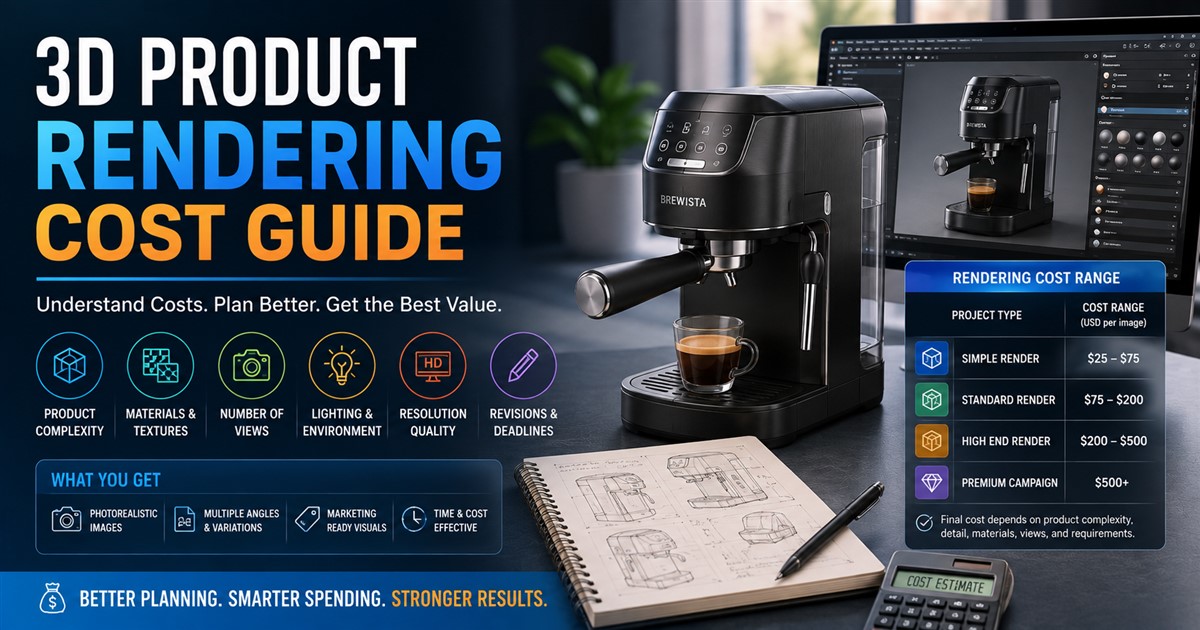
The cost of 3D product rendering can vary widely. A simple product with one clean studio render may require much less work than a complex product with many parts, realistic materials, multiple camera angles, and several versions.
Instead of focusing only on a price per image, businesses should look at the complete scope of the project.
| Project Type | Typical Complexity | Cost Level |
|---|---|---|
| Simple product render | Basic shape, simple materials, one or two views | Low |
| Standard product rendering | Detailed product, realistic materials, several views | Moderate |
| High-end rendering | Complex geometry, detailed textures, advanced lighting | Higher |
| Premium campaign rendering | Multiple products, environments, variations, and high-resolution outputs | High |
These categories are general guidelines rather than fixed prices. A professional provider will normally review the product and project requirements before giving a final quote.
What Factors Affect 3D Product Rendering Cost?
Several factors can increase or decrease the total cost. Understanding them can help businesses create a realistic budget and avoid unexpected expenses.
1. Product Complexity
The complexity of the product is one of the most important cost factors.
A simple bottle, box, or basic household object may be relatively easy to prepare for rendering. A product with many components, curved surfaces, small parts, mechanical features, or complex shapes will require more preparation.
More complex geometry usually means more modeling, material setup, lighting adjustments, and quality checks.
2. Whether a 3D Model Already Exists
If you already have an accurate 3D model, the rendering process can often start sooner. However, the existing model may still need cleaning, optimization, material setup, or other preparation before it can produce high-quality images.
If no suitable model exists, the service provider may need to create one from CAD drawings, sketches, photographs, or product samples. This adds modeling work to the project.
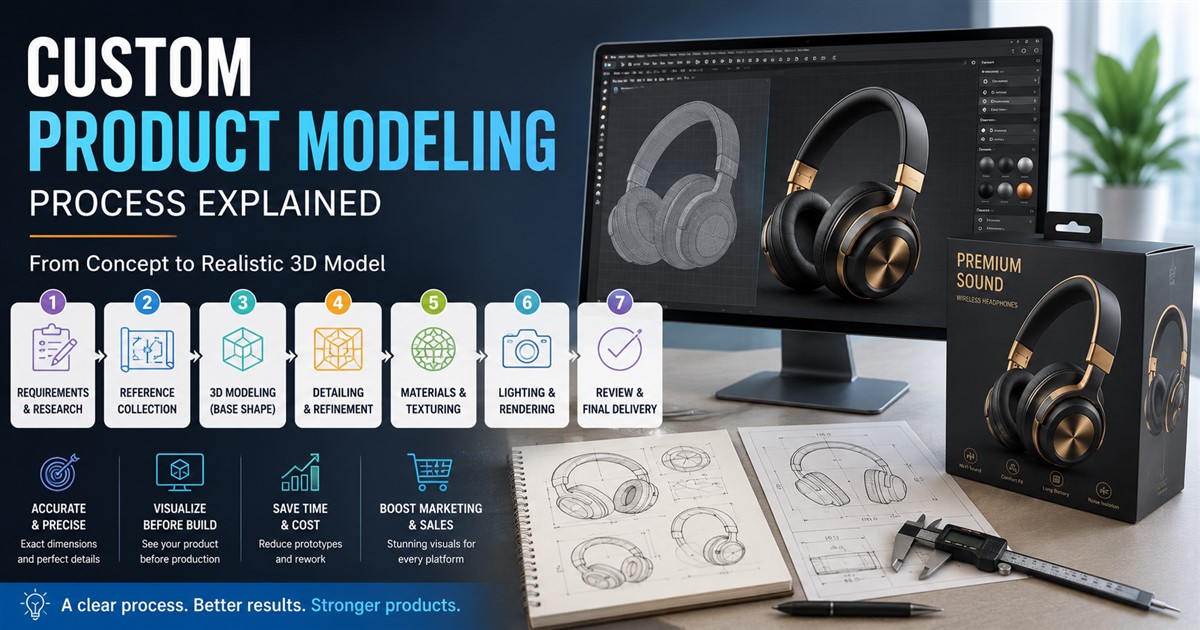
Businesses can review this product modeling process guide to understand how a product can move from reference materials to a finished digital model.
3. Level of Realism
Not every render needs to look completely photorealistic.
A simple image for an internal presentation may only need basic materials and lighting. A hero image for a major advertising campaign may require detailed surface textures, realistic reflections, accurate shadows, and carefully controlled lighting.
The more realistic the final image needs to be, the more time may be required for setup and refinement.
4. Materials and Textures
Materials have a major effect on how realistic a product looks.
A simple matte plastic surface may be easy to create. Materials such as glass, brushed metal, leather, fabric, polished plastic, chrome, or transparent surfaces can require more careful work.
Textures can also include small details such as scratches, surface patterns, grain, printed designs, labels, and other visual elements.
5. Number of Rendered Images
The number of final images is another important factor.
If you only need one front-facing product image, the project may be relatively simple. If you need front, back, side, top, close-up, lifestyle, and detail views, the workload increases.
| Number of Views | Common Use | Cost Impact |
|---|---|---|
| 1 view | Basic product listing or presentation | Lower |
| 2–4 views | E-commerce and product catalogs | Moderate |
| 5–10 views | Detailed product presentation | Higher |
| 10+ views | Large campaigns or complete product visualization | Higher still |
6. Background and Environment
A clean white background is usually simpler than a detailed lifestyle scene.
For example, a product render may be placed on a simple studio floor with soft lighting. Another project may require a complete kitchen, office, bathroom, retail store, or outdoor environment.
Creating additional objects, surfaces, lighting, and environmental details can increase the amount of work required.
7. Lighting Requirements
Lighting can make a major difference in the final quality of a product render.
Basic studio lighting may be enough for an online product listing. Advertising images may require more carefully planned lighting to highlight specific product features.
Reflective products can be particularly challenging because the lighting setup affects what appears on their surfaces.
8. Image Resolution
The final image size also matters. A small image for a website thumbnail requires less than a large, high-resolution image intended for print advertising.
Businesses should tell the rendering provider where the images will be used. This helps the provider prepare the correct output size and quality.
9. Revisions
Revisions are another factor that can affect project cost.
A small change to a camera angle or background may be simple. More significant changes, such as changing the product shape or rebuilding a material, can require additional work.
Before starting a project, it is helpful to understand how many revision rounds are included in the quote.
10. Project Deadline
Urgent projects may cost more if they require a provider to prioritize the work or allocate additional resources.
If a business has a flexible schedule, sharing the deadline early can help the service provider create a practical production plan.
3D Product Rendering Pricing Structure
Different providers may use different pricing methods. Understanding the common approaches can make it easier to compare quotes.
| Pricing Method | How It Works | Best For |
|---|---|---|
| Per image | You pay for each final render. | Projects with a small number of views |
| Per product | A price is provided for modeling and rendering each product. | Multiple similar products |
| Hourly | You pay based on the time spent on the project. | Projects with changing requirements |
| Project-based | A total price is agreed upon for the complete scope. | Clearly defined projects |
| Package pricing | A group of models, renders, or services is included. | Large product collections |
3D Product Rendering for E-Commerce
E-commerce is one of the biggest uses for product rendering. Online customers depend heavily on product images because they cannot physically inspect the product before buying.
3D renders can show products from different angles and create clean, consistent images across an online store.
They can also make it easier to create product variations. For example, one model could be rendered in black, white, blue, and red without requiring a separate photography session for every color.
Businesses planning an online product presentation can also explore this 3D product modeling guide for e-commerce for additional information.
3D Rendering vs. Product Photography
Traditional photography and 3D rendering can both produce high-quality product images. The better option depends on the product, budget, timeline, and marketing needs.
| Factor | 3D Rendering | Product Photography |
|---|---|---|
| Physical product needed | Not always | Usually yes |
| Design changes | Can often be updated digitally | May require another shoot |
| Color variations | Easy to create digitally | May require additional setup |
| Environment changes | Highly flexible | Requires a new setup or editing |
| Pre-launch visuals | Can be created before production | Usually requires a physical sample |
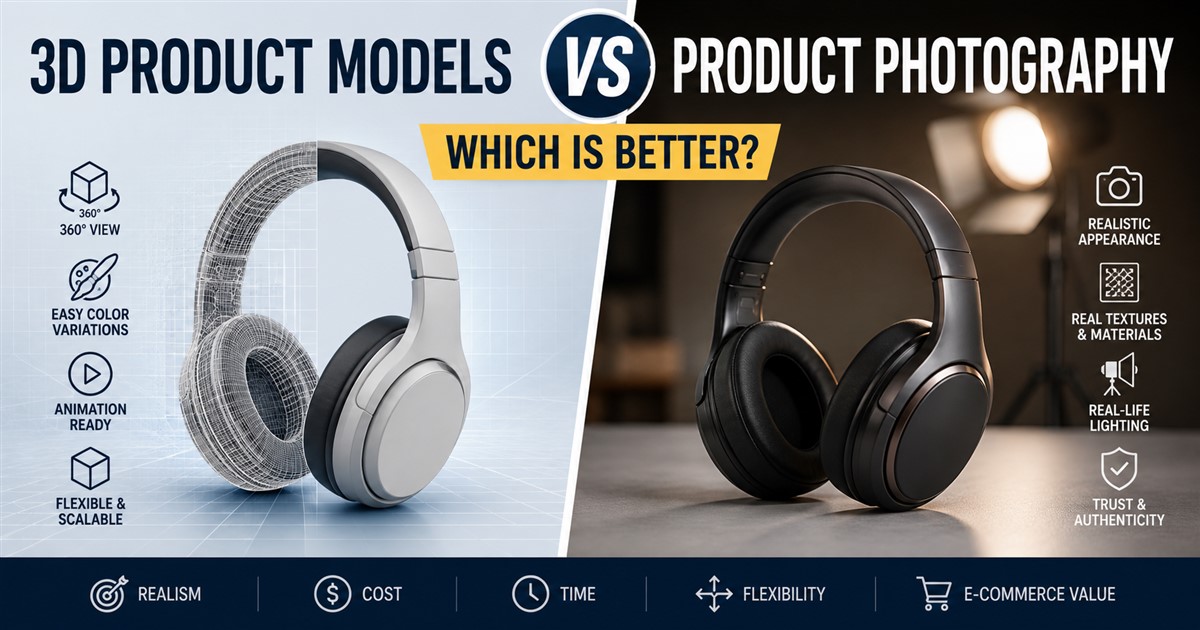
For a more detailed comparison, businesses can read about 3D product models versus product photography.
How to Reduce 3D Product Rendering Costs
Getting a lower price does not always mean choosing the cheapest provider. A better approach is to make the project clear and avoid unnecessary work.
Provide Complete References
Give the artist accurate dimensions, drawings, photos, CAD files, logos, and other available information. Better references can reduce guesswork and revisions.
Define the Final Use
Tell the provider whether the renders will be used for e-commerce, print, advertising, social media, presentations, or another purpose.
Plan All Required Views Together
If you know that you need several camera angles, include them in the original project brief. Planning them together can make the workflow more efficient.
Reuse Existing 3D Models
If you already have a suitable model, ask whether it can be used. It may only need preparation and material work rather than being rebuilt from the beginning.
Limit Unnecessary Revisions
Clear instructions and an approval process can help reduce repeated changes. Review the first draft carefully and provide consolidated feedback where possible.
How to Choose a 3D Rendering Provider
Price is important, but it should not be the only factor when selecting a 3D rendering provider.
Look at the provider’s portfolio and check whether they have experience with products similar to yours. A provider who understands your industry may be better prepared to handle the specific shapes, materials, and presentation style required.
Communication is also important. The provider should understand your requirements, explain the workflow clearly, and provide a reasonable timeline.
Before hiring a provider, it can be useful to review this guide on questions to ask before hiring a 3D artist.
Questions to Ask Before Getting a Quote
- Do you need to create the 3D model from scratch?
- How many final images are required?
- What image resolution is needed?
- Are realistic materials and textures required?
- Will lifestyle environments be included?
- How many revision rounds are included?
- What file formats will be delivered?
- What is the expected turnaround time?
- Are source files included?
- Are additional variations included in the quote?
3D Rendering for Marketing Campaigns
3D product rendering is not limited to e-commerce. Brands can use realistic renders across many marketing channels.
A single product model can be used to create website banners, social media graphics, digital advertisements, brochures, catalogs, product launch visuals, presentations, and videos.
This makes 3D rendering especially useful for companies that want a consistent visual style across different marketing channels.
Brands interested in broader applications can also explore how 3D models can support marketing campaigns.
Common Mistakes That Increase Rendering Costs
Starting Without a Clear Brief
If the provider does not know what the final images are for, additional changes may be needed later.
Changing the Product Too Late
Changing the product geometry after detailed rendering has started can require significant extra work.
Requesting Too Many Unnecessary Variations
Every additional product color, angle, environment, and resolution can add to the workload. Decide which variations are actually needed.
Using Poor Source Files
Low-quality reference images or incomplete drawings can slow down modeling and increase the chance of revisions.
Ignoring the Final Platform
An image designed for a website may have different requirements from one intended for a large printed advertisement. The final platform should be known before rendering begins.
Frequently Asked Questions
How much does a 3D product render cost?
The cost depends on product complexity, whether a 3D model already exists, the level of realism, number of views, materials, lighting, resolution, revisions, and deadline. Simple renders generally require less work than complex photorealistic projects.
Is 3D rendering cheaper than product photography?
It depends on the project. 3D rendering can be cost-effective when a business needs many variations, multiple environments, or visuals before the physical product is available. Photography may be more practical for some products and campaigns.
Do I need a 3D model before ordering rendering?
Not necessarily. A rendering provider may be able to create the 3D model from CAD files, drawings, photographs, measurements, or other references. However, creating the model adds to the total project scope.
How many product images should I order?
It depends on how the images will be used. An e-commerce listing may need several angles, while an advertising campaign may focus on a few high-quality hero images.
Can 3D renders show different product colors?
Yes. Once the model and materials are prepared, different colors and finishes can often be created digitally without rebuilding the entire product.
Can 3D renders be used for Amazon or other marketplaces?
Yes. 3D renders can be used for online marketplace product visuals as long as they meet the platform’s image requirements and accurately represent the product.
What makes a product render look realistic?
Accurate modeling, realistic materials, detailed textures, good lighting, natural shadows, reflections, camera settings, and high-quality rendering all contribute to realism.
How long does 3D product rendering take?
The timeline varies based on product complexity, number of images, modeling requirements, materials, revisions, and resolution. A simple render can take much less time than a large campaign involving many products and environments.
Final Thoughts
The cost of 3D product rendering depends on much more than simply producing an image. The complete process can involve 3D modeling, material creation, texture work, lighting, camera setup, rendering, revisions, and final file preparation.
The best way to control costs is to define the project clearly before work begins. Provide accurate product information, explain where the renders will be used, decide how many views are needed, and identify the required image quality.
Businesses should also compare providers based on portfolio quality, experience, communication, workflow, turnaround time, and included services rather than choosing only by the lowest quote.
When planned properly, 3D product rendering can become a valuable digital asset. One well-made product model can support e-commerce, advertising, product presentations, social media, catalogs, and many other marketing activities.
For businesses that need consistent, reusable product visuals, investing in professional 3D rendering can make it easier to present products clearly and create high-quality marketing content across multiple channels.