
Generative AI is changing the way products are designed, developed, and improved. In the past, CAD designers often had to create many design versions manually, test each option, and make changes one step at a time. Today, generative AI can help designers explore many ideas quickly and find solutions based on specific requirements.
Generative AI in CAD design combines artificial intelligence with computer-aided design tools to support faster and smarter product development. Instead of simply drawing what a designer already has in mind, AI can help generate possible designs based on goals such as size, weight, strength, material, cost, performance, and manufacturing method.
This technology does not mean that CAD designers are no longer needed. In most professional projects, human knowledge is still essential. AI can create options, but engineers and designers need to decide whether those options are practical, safe, attractive, and suitable for manufacturing.
As AI technology becomes more capable, its role in CAD is expected to grow. Companies that understand how to use it effectively can potentially reduce design time, explore more ideas, and improve their product development process.
What Is Generative AI in CAD Design?
Generative AI in CAD design refers to the use of artificial intelligence to create, modify, or optimize computer-aided design concepts based on user requirements. Instead of manually creating every possible design, a designer or engineer provides information about what the product needs to achieve.
For example, an engineer designing a mechanical bracket may provide requirements for the mounting points, available space, maximum weight, required strength, material, and manufacturing process. An AI-assisted system can then explore different geometric solutions that meet those requirements.
The designer can review the generated options and select the most suitable concept. The chosen design can then be refined using traditional CAD tools and engineering knowledge.
This approach is different from simple automation. Automation follows predefined instructions, while generative systems can explore multiple possible solutions based on the information they receive.
How Does Generative AI Work With CAD?
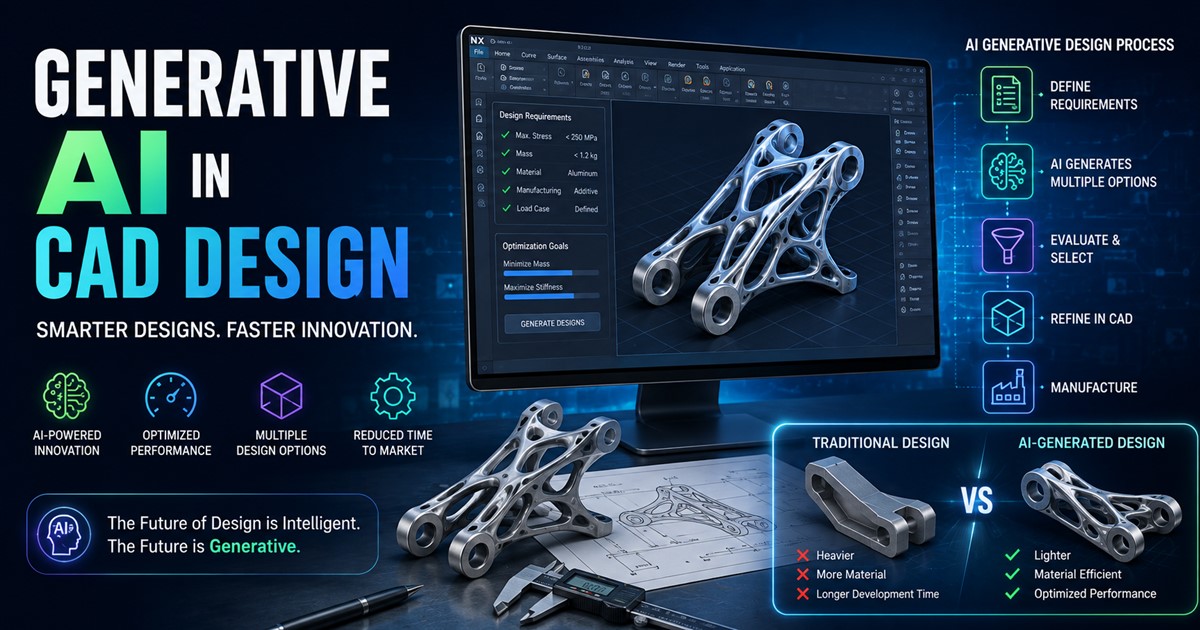
A typical generative CAD workflow starts with a set of design requirements. These requirements may include dimensions, loads, materials, manufacturing limitations, connection points, performance targets, and cost considerations.
The AI or generative design system processes these requirements and explores different design possibilities. It may create multiple shapes that satisfy the given conditions. Some designs may be lightweight, while others may focus more on strength or ease of manufacturing.
The designer then reviews the results. Designs that do not meet the project requirements can be removed. The remaining concepts can be tested, modified, and prepared for further engineering work.
| Stage | What Happens |
|---|---|
| Requirements | Design goals, dimensions, materials, and constraints are defined. |
| AI Generation | The system explores multiple possible design solutions. |
| Evaluation | Designs are compared based on performance and project goals. |
| Human Review | Engineers and designers check the most useful options. |
| CAD Refinement | The selected concept is developed into a detailed CAD model. |
| Manufacturing | The final design is prepared for prototyping or production. |
Generative AI vs. Traditional CAD Design
Traditional CAD remains one of the most important tools in engineering and product design. Designers use CAD software to create accurate models, assemblies, drawings, and technical documentation.
The main difference is how design options are explored. In traditional CAD, a designer usually creates a concept and then manually changes it. If the designer wants to compare several alternatives, each version may require additional work.
Generative AI can help automate part of this exploration. Instead of creating every variation manually, the system can generate multiple options based on the rules provided by the user.
| Traditional CAD | Generative AI-Assisted CAD |
|---|---|
| Designer creates most concepts manually | AI can generate multiple concepts |
| Design changes can take more time | Many alternatives can be explored quickly |
| Strong control over geometry | Strong exploration of design possibilities |
| Relies heavily on designer experience | Combines designer knowledge with computational exploration |
| Well established for production work | Increasingly used for optimization and concept generation |
These approaches do not have to compete. In many workflows, the best solution is to use generative AI for exploration and traditional CAD for detailed development.
Understanding the difference between 3D CAD modeling and CAD drafting can also help businesses choose the right type of technical service for a project.
Key Benefits of Generative AI in CAD
1. Faster Concept Development
One of the biggest benefits is speed. A designer may spend a significant amount of time developing and comparing different concepts. Generative systems can help create several alternatives much faster.
This does not mean the entire design process becomes automatic. Instead, designers can spend less time creating basic variations and more time reviewing, improving, and selecting the best concepts.
2. More Design Options
Human designers naturally have limits on how many ideas they can explore within a fixed amount of time. Generative AI can examine a much larger design space.
This can lead to solutions that may not have been considered during a traditional design process. Some generated designs may look unusual, but they can sometimes provide useful ways to reduce weight, improve performance, or use materials more efficiently.
3. Weight Reduction
Reducing product weight can be important in industries such as aerospace, automotive, robotics, and consumer electronics. A lighter component can sometimes reduce material use and improve overall product efficiency.
Generative design tools can explore complex shapes that use material only where it is needed based on defined requirements.
4. Better Material Use
Generative AI can help designers investigate ways to use materials more efficiently. This is especially useful when material costs are high or when reducing waste is an important project goal.
However, the final design still needs to be evaluated for manufacturing, durability, safety, and other technical requirements.
5. Faster Product Iteration
Product development often requires many rounds of changes. A client may request a smaller component, a lighter housing, a different mounting system, or improved performance.
AI-assisted workflows can make it easier to explore these changes and compare alternatives. Faster iteration can help teams move from an early concept toward a final design more efficiently.
Applications of Generative AI in CAD
Generative AI can be useful in many industries. Its value depends on the type of product, design requirements, and manufacturing process.
| Industry | Possible Application | Potential Benefit |
|---|---|---|
| Automotive | Vehicle components and structural parts | Weight reduction and design exploration |
| Aerospace | Lightweight components | Material and weight optimization |
| Manufacturing | Machine parts and tooling | Faster product development |
| Consumer Products | Housings, accessories, and product structures | More design options |
| Robotics | Robot components and mechanisms | Performance-focused design |
| Architecture | Concept development and complex forms | Faster design exploration |
Generative AI for Product Design
Product designers can use generative AI to explore shapes, structures, and product concepts before moving into detailed CAD development. This can be particularly useful during the early stages of product development.
For example, imagine a company developing a new handheld electronic device. The team may have requirements for the internal components, screen, buttons, battery, cooling system, and external dimensions. AI-assisted design can help explore different housing concepts while keeping these constraints in mind.
The selected concept can then be developed into a production-ready model with detailed dimensions, materials, assemblies, and manufacturing information.
Companies looking to create accurate digital product assets can also explore professional 3D product modeling as part of their product development workflow.
Generative AI and Manufacturing
Generative AI becomes particularly interesting when it is connected to manufacturing requirements. A design that looks good on a computer is not automatically suitable for production.
The manufacturing method affects the design. A part produced through CNC machining may have different requirements from one produced through injection molding or additive manufacturing.
Generative systems can consider some of these limitations when they are included in the design process. This can help create concepts that are better suited to the intended production method.
For companies involved in production, 3D modeling for manufacturing can help connect digital product designs with real production requirements.
Generative Design and 3D Printing
3D printing is another area where generative design can be useful. Additive manufacturing can produce complex shapes that may be difficult or expensive to manufacture using traditional methods.
Generative design can create structures with complex geometry, internal patterns, and organic shapes. These designs can then be tested for printing and adjusted for the selected material and printer.
However, not every AI-generated model is automatically ready for 3D printing. The geometry may need to be repaired, scaled, optimized, or converted into the correct file format before production.
How Generative AI Can Improve the Design Process
Generative AI can support several stages of the product development process. It can help teams move from a broad idea to several possible solutions and then refine the selected option.
- Define the problem: Clearly identify what the product or component needs to do.
- Set constraints: Add dimensions, materials, loads, manufacturing methods, and other limitations.
- Generate concepts: Allow the AI or generative design system to explore possible solutions.
- Compare results: Review designs based on performance, cost, weight, appearance, and manufacturing needs.
- Select a concept: Choose the design that best matches the project requirements.
- Refine the CAD model: Develop the selected concept into a detailed and usable model.
- Test and validate: Perform appropriate engineering and manufacturing checks.
The Role of Human Designers
Human expertise remains one of the most important parts of an AI-assisted CAD workflow. AI can generate options, but people must understand the real-world context behind the design.
An experienced designer can recognize when a generated concept is difficult to manufacture, too expensive, visually unsuitable, or inconsistent with the client’s requirements.
Engineers also need to consider safety, tolerances, materials, assembly, maintenance, regulations, and other factors that may not be fully understood by an AI system.
This is why the future of CAD is more likely to involve human-AI collaboration rather than complete replacement of designers.
Challenges of Generative AI in CAD
Despite its benefits, generative AI has limitations. One major issue is that generated designs may not always be practical. An attractive or mathematically optimized shape may still be difficult to manufacture or assemble.
Another challenge is data quality. AI systems depend on the information they receive. Incorrect dimensions, incomplete requirements, or poor input data can lead to poor results.
There can also be concerns about intellectual property, confidential product information, software compatibility, and control over AI-generated designs.
| Challenge | Why It Matters | How to Address It |
|---|---|---|
| Incorrect geometry | May cause problems during production | Perform professional CAD review |
| Poor input data | Can produce unsuitable designs | Define requirements carefully |
| Manufacturing limits | Some generated shapes may be difficult to produce | Include manufacturing constraints |
| Data security | Confidential designs may require protection | Use suitable secure platforms and workflows |
| Human oversight | AI cannot replace engineering judgment | Keep expert review in the workflow |
Will Generative AI Replace CAD Designers?
It is unlikely that generative AI will completely replace CAD designers. Instead, it is more likely to change what designers spend their time doing.
Repetitive tasks and early concept exploration may become more automated. Designers may spend more time defining requirements, reviewing AI-generated concepts, improving designs, coordinating with engineers, and solving complex problems.
This means CAD professionals who learn how to use AI tools may have an advantage. The ability to combine traditional modeling skills with AI-assisted workflows can become an important professional skill.
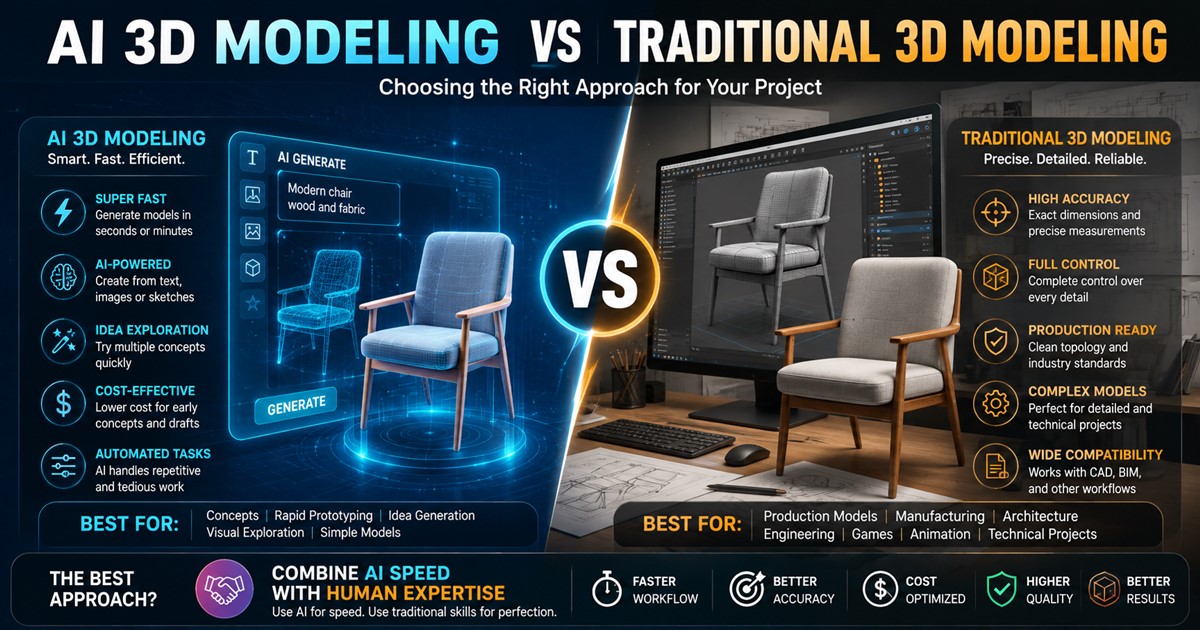
Businesses should also understand that AI and traditional modeling are not always interchangeable. For a deeper comparison, it is useful to understand AI 3D modeling versus traditional 3D modeling and where each approach works best.
What Skills Will Future CAD Designers Need?
The CAD designer of the future will likely need both technical and digital skills. Traditional knowledge of CAD software will remain important, but professionals may also need to understand AI-assisted design, automation, simulation, manufacturing, and data management.
| Skill | Importance in the Future |
|---|---|
| CAD Modeling | Essential for creating and refining accurate designs |
| Generative Design | Helps explore more design possibilities |
| Engineering Knowledge | Helps validate practical and safe designs |
| Manufacturing Knowledge | Ensures designs can be produced effectively |
| AI Skills | Helps professionals use new design tools efficiently |
| Problem Solving | Remains important when projects have complex requirements |
The Future of Generative AI in CAD
Generative AI is still developing, and future CAD systems are likely to become more intelligent and easier to use. Instead of entering every requirement through complex interfaces, designers may increasingly interact with CAD systems using natural language, sketches, images, and other forms of input.
A designer could potentially describe a product, provide its key dimensions and performance requirements, and receive several editable design concepts. The system could then help analyze the options and identify possible improvements.
AI may also become more closely connected to simulation, manufacturing data, digital twins, and product lifecycle management. This could create a more connected workflow from initial concept through production and product maintenance.
How Businesses Can Prepare for AI-Assisted CAD
Companies do not need to replace their existing CAD systems immediately. A better approach is to identify specific tasks where AI can provide value.
- Start with concept development: Use AI to explore early ideas and alternatives.
- Automate repetitive work: Identify tasks that consume time but require limited creative input.
- Train designers: Help CAD professionals learn how AI-assisted tools work.
- Keep quality checks: Review every important AI-generated design before production.
- Protect project data: Make sure confidential CAD files are handled through suitable systems.
- Measure results: Track design time, revisions, costs, and product quality to see whether AI is actually helping.
Frequently Asked Questions About Generative AI in CAD
What is generative AI in CAD?
Generative AI in CAD uses artificial intelligence to help create, explore, modify, or optimize design concepts. Users provide requirements and constraints, and the system can generate possible solutions for review.
Is generative AI the same as CAD?
No. CAD is a broader design technology used to create accurate digital models and drawings. Generative AI is an additional technology that can help explore or optimize design solutions within or alongside CAD workflows.
Can AI create a complete CAD model?
Some AI-powered systems can generate useful 3D geometry or design concepts, but the amount of human work required depends on the project. Professional models often need additional refinement, measurements, engineering checks, and manufacturing preparation.
What are the main benefits of generative AI in CAD?
The main benefits include faster concept generation, more design alternatives, potential weight and material savings, faster iteration, and support for optimization.
Can generative AI be used for manufacturing?
Yes. Generative design can be used to explore components and products based on manufacturing requirements. The final design should still be reviewed for the selected manufacturing method, material, tolerances, assembly, and other production requirements.
Will AI replace CAD engineers?
AI is more likely to support CAD engineers than completely replace them. Engineering judgment, product knowledge, manufacturing experience, safety considerations, and client requirements still require human expertise.
Is traditional CAD still important?
Yes. Traditional CAD remains essential for detailed modeling, engineering documentation, assemblies, manufacturing drawings, and precise product development. Generative AI can enhance these workflows rather than make them unnecessary.
Final Thoughts
Generative AI is becoming an important part of the future of CAD design. It can help designers explore more ideas, reduce repetitive work, speed up development, and investigate solutions that may be difficult to discover through manual design alone.
However, successful AI-assisted CAD is not simply about generating a model. The real value comes from combining AI with accurate requirements, professional CAD skills, engineering knowledge, manufacturing experience, and careful quality control.
In the coming years, CAD professionals will likely use AI as another tool in their workflow. Designers who understand how to guide AI, evaluate its results, and refine its output can create a powerful combination of speed and expertise.
For businesses, the goal should be to use generative AI where it solves real design problems while keeping human expertise at the center of important decisions. When used correctly, generative AI can make CAD design faster, more flexible, and more innovative without removing the value of skilled professionals.
If you are planning a CAD or 3D design project and need professional support, you can contact a 3D modeling team to discuss your requirements, project goals, and preferred workflow.