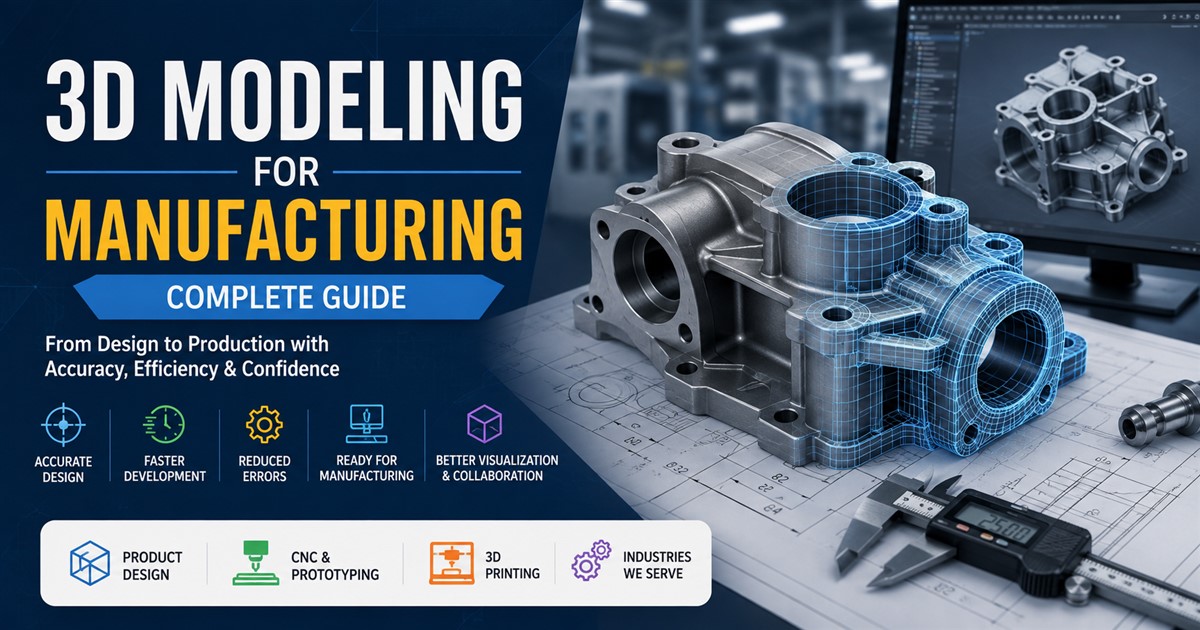

Manufacturing has changed quickly with the use of digital design tools. Today, manufacturers can create, test, improve, and present products in a digital environment before making a physical part. One of the most useful technologies behind this process is 3D modeling for manufacturing.
A detailed 3D model gives engineers, designers, manufacturers, and other teams a clear digital version of a product or component. It can show the shape, size, measurements, materials, connections, and other important details needed during product development and production.
Whether you are designing a simple machine part, consumer product, industrial equipment, or a complex assembly, 3D modeling can help reduce design errors and make the manufacturing process more efficient.
In this complete guide, we will explain what 3D modeling for manufacturing is, how it works, its benefits, common applications, file formats, costs, and how to choose the right 3D modeling service provider.
What Is 3D Modeling for Manufacturing?
3D modeling for manufacturing is the process of creating a digital three-dimensional representation of a physical product, part, component, or assembly. The model is created using CAD and other 3D design software and can contain accurate dimensions and technical information.
Unlike a simple visual model, a manufacturing-ready 3D model is usually created with accuracy and production requirements in mind. Engineers can use the model to review dimensions, check how parts fit together, identify design problems, and prepare files for manufacturing.
For example, a manufacturer developing a metal bracket can create a 3D CAD model before producing the bracket. The model can show its thickness, holes, angles, bends, and mounting points. Engineers can review the design digitally and make changes before material is cut or machinery is used.
This makes 3D modeling an important part of modern product development and manufacturing workflows.
Why Is 3D Modeling Important in Manufacturing?
Traditional manufacturing often required teams to depend heavily on 2D drawings and physical prototypes. While these methods are still useful, 3D models provide a more complete view of a product.
A 3D model allows teams to look at a product from different angles and understand how individual parts work together. It can also make communication easier between designers, engineers, manufacturers, suppliers, and clients.
For businesses that need accurate technical documentation, CAD drafting services can also complement 3D modeling by providing detailed drawings and production documentation.
Key Benefits of 3D Modeling for Manufacturing
1. Better Design Accuracy
Manufacturing requires precise measurements. A small design mistake can lead to production problems, wasted materials, or parts that do not fit correctly.
Accurate 3D models help designers and engineers check dimensions and geometry before production begins. This can reduce mistakes and improve the quality of the final product.
2. Faster Product Development
Making physical prototypes for every design change can take time. With a digital 3D model, teams can make changes quickly and review different versions without immediately producing a physical prototype.
This can shorten the product development process, especially when a product requires multiple design revisions.
3. Reduced Production Errors
Manufacturing errors can be expensive. Incorrect dimensions, missing features, or poor part alignment can cause production delays.
A properly prepared 3D model gives production teams a detailed reference. It can also be used with modern manufacturing technologies to help produce parts more accurately.
4. Improved Communication
A 3D model is often easier to understand than a technical description alone. Teams can rotate the model, zoom into specific areas, and inspect different components.
This is particularly useful when engineers, clients, manufacturers, and suppliers are working from different locations.
5. Easier Design Changes
Product designs often change during development. A hole may need to move, a component may need to become thicker, or two parts may need to be redesigned.
With a well-structured 3D model, designers can make these changes digitally and review the updated design before production.
6. Better Prototyping
3D models can support rapid prototyping methods such as 3D printing. Instead of creating a prototype from scratch, the digital model can be prepared for prototyping and used to produce a physical version of the design.
Common Applications of 3D Modeling in Manufacturing
3D modeling is used across many manufacturing industries. Some applications require simple components, while others involve complex assemblies with hundreds or thousands of parts.
| Application | How 3D Modeling Helps |
|---|---|
| Product Design | Creates accurate digital versions of new products. |
| Machine Parts | Defines dimensions and geometry for mechanical components. |
| Industrial Equipment | Helps design large machines and complex assemblies. |
| Consumer Products | Supports product development, testing, and visualization. |
| Automotive Parts | Helps develop vehicle components and assemblies. |
| Prototyping | Provides digital files for rapid physical prototypes. |
| Reverse Engineering | Converts physical parts into usable digital models. |
| Tooling and Fixtures | Helps create accurate manufacturing tools and fixtures. |
Types of 3D Models Used in Manufacturing
Parametric CAD Models
Parametric models are created using dimensions and design rules. If a specific measurement needs to change, related parts of the model can often update automatically.
These models are widely used for engineering and mechanical design because they provide control over dimensions and design relationships.
Surface Models
Surface modeling focuses on the outer shape of an object. It is useful for products where appearance and complex curves are important.
Consumer products, automotive components, furniture, and other products with curved surfaces may benefit from surface modeling.
Solid Models
Solid models represent complete three-dimensional objects. They can provide information about volume, shape, and other physical properties.
Solid modeling is commonly used for mechanical components and manufacturing applications where accurate physical representation is important.
Assembly Models
An assembly model combines multiple components into one digital structure. It allows engineers to review how parts fit and interact with each other.
This can help identify potential clearance problems or design conflicts before physical production.
3D Modeling Workflow for Manufacturing
A typical manufacturing modeling project follows several stages. The exact workflow depends on the product, required accuracy, software, and final manufacturing method.
- Collect project requirements: Gather drawings, sketches, measurements, reference images, existing CAD files, and other available information.
- Review the design: Analyze the available information and identify missing dimensions or technical details.
- Create the initial model: Build the basic geometry using suitable CAD software.
- Add accurate details: Add dimensions, holes, threads, curves, components, and other required features.
- Check the model: Review geometry, measurements, assembly relationships, and potential design problems.
- Make revisions: Update the model based on engineering or client feedback.
- Prepare final files: Export the model into the formats required by the manufacturer or production system.
For a more detailed explanation of each stage, see this guide to the 3D modeling project workflow.
Popular File Formats for Manufacturing
The correct file format depends on how the model will be used. Some formats are better for editing, while others are commonly used for sharing or manufacturing.
| File Format | Common Use |
|---|---|
| STEP | Sharing accurate CAD models between different CAD systems. |
| IGES | Exchanging CAD geometry between different software platforms. |
| STL | 3D printing and rapid prototyping. |
| OBJ | 3D visualization and polygon-based applications. |
| DWG | CAD drawings and technical design documentation. |
| DXF | 2D CAD data exchange and manufacturing workflows. |
Before delivering a model, always confirm which file format your manufacturer, CNC operator, 3D printer, or engineering team requires.
3D CAD Modeling vs. CAD Drafting
3D CAD modeling and CAD drafting are related but different services. CAD drafting generally focuses on creating technical drawings, while 3D CAD modeling creates a three-dimensional representation of the product or component.
| Feature | 3D CAD Modeling | CAD Drafting |
|---|---|---|
| Main Output | 3D digital model | 2D technical drawing |
| Visualization | High | Limited |
| Assembly Review | Very useful | More limited |
| Manufacturing Documentation | Can support it | Commonly used |
| 3D Printing | Suitable | Not directly suitable |
Many manufacturing projects benefit from using both. The 3D model can represent the product, while detailed drawings can communicate important manufacturing dimensions and instructions.
How 3D Modeling Supports CNC Manufacturing
Computer numerical control, commonly known as CNC, uses computer-controlled machinery to manufacture parts from materials such as metal, plastic, and wood.
A detailed CAD model can serve as an important part of the CNC workflow. Depending on the manufacturing process, the model may be imported into CAM software, where toolpaths are created for the CNC machine.
A good model can help reduce manual work and provide a reliable digital reference for the manufacturing process. However, the final CNC workflow still needs to account for tooling, material, machine capabilities, tolerances, and production requirements.
3D Modeling for Prototyping and 3D Printing
3D printing has made digital modeling even more valuable for manufacturers. A company can design a part digitally, review it, and create a physical prototype without immediately committing to large-scale production.
This approach is useful for testing product shape, fit, size, and basic functionality. If the prototype reveals a problem, the digital model can be modified and another version can be produced.
This process can be repeated until the design meets the required specifications.
How Much Does Manufacturing 3D Modeling Cost?
The price of a 3D modeling project can vary widely. A simple component with clear drawings may cost much less than a complex assembly that requires reverse engineering and many revisions.
Common factors that affect the cost include:
- Product or component complexity
- Number of parts
- Required level of detail
- Accuracy and tolerance requirements
- Availability of reference drawings
- Whether reverse engineering is required
- Required file formats
- Number of revisions
- Project deadline
- Additional rendering or visualization requirements
For businesses planning a project, understanding these factors can make it easier to set a realistic budget before work begins.
In-House vs. Outsourcing 3D Modeling
Manufacturers generally have two choices: build an internal 3D modeling team or outsource the work to an external provider.
| Factor | In-House | Outsourcing |
|---|---|---|
| Initial Investment | Usually higher | Usually lower |
| Software Costs | Company pays directly | Often included in service cost |
| Hiring | Required | Not always required |
| Scalability | Depends on team size | Can scale based on project needs |
| Specialized Skills | Requires internal expertise | Can access external specialists |
Outsourcing can be useful for companies that have occasional modeling requirements or need additional support during busy periods. It can also help businesses access experienced professionals without building a large internal team.
How to Choose a 3D Modeling Service Provider
Choosing the right service provider is important because the quality of the model can directly affect later stages of product development and manufacturing.
Before hiring a provider, review their portfolio and check whether they have experience with projects similar to yours. Ask about their CAD software, file formats, quality-control process, revision policy, delivery timeline, and communication process.
You should also make sure the provider understands manufacturing requirements rather than focusing only on visual appearance.
Look for a provider that can deliver accurate, organized, and production-ready models according to your requirements.
Best Practices for Manufacturing 3D Models
- Start with accurate information: Use reliable measurements, drawings, specifications, and reference files.
- Define requirements early: Confirm dimensions, tolerances, materials, file formats, and intended manufacturing method.
- Keep models organized: Use clear names and logical structures for parts and assemblies.
- Check dimensions: Review critical measurements before final delivery.
- Consider manufacturing limitations: Make sure the design is suitable for the intended manufacturing process.
- Review assemblies: Check how components fit together before production.
- Keep revision records: Track major design changes so teams know which version is current.
- Confirm file compatibility: Make sure the final files work with the software or machines being used.
Future of 3D Modeling in Manufacturing
3D modeling is becoming more connected with automation, artificial intelligence, digital manufacturing, simulation, and cloud-based collaboration.
AI-assisted tools can help designers generate ideas, modify geometry, and automate some repetitive tasks. At the same time, advanced CAD systems continue to provide better simulation and design-analysis capabilities.
Manufacturers are also using digital models as part of broader digital workflows. A product can move from concept to CAD model, simulation, prototype, manufacturing, and marketing while maintaining a digital representation throughout the process.
These developments are likely to make digital modeling an even more important part of modern manufacturing.
Conclusion
3D modeling for manufacturing helps businesses turn product ideas into accurate digital designs that can support engineering, prototyping, production, and product development. It can improve communication, reduce design mistakes, speed up revisions, and make manufacturing workflows more efficient.
From simple machine components to complex industrial assemblies, a well-made 3D model provides a valuable digital foundation for the manufacturing process.
The key is to create models that are not only visually accurate but also suitable for their intended manufacturing purpose. Clear requirements, accurate measurements, suitable file formats, and experienced modeling professionals can all contribute to a better final result.
If your business needs professional support, you can explore 3D Modeling Service for different modeling solutions or contact the team to discuss your manufacturing modeling requirements.
Frequently Asked Questions About 3D Modeling for Manufacturing
What is 3D modeling used for in manufacturing?
3D modeling is used to design and review products, machine parts, tools, equipment, and assemblies before production. It can also support prototyping, CNC manufacturing, 3D printing, engineering analysis, and technical documentation.
Can a 3D model be used for CNC machining?
Yes. A suitable CAD model can be used as part of a CNC manufacturing workflow. The model may be imported into CAM software to create toolpaths based on the machine, material, tooling, and manufacturing requirements.
What information is needed to create a manufacturing 3D model?
Useful information can include technical drawings, dimensions, sketches, reference photographs, existing CAD files, product samples, material information, tolerances, and manufacturing requirements. The more accurate the source information, the easier it is to create a reliable model.
How long does manufacturing 3D modeling take?
The timeline depends on the complexity of the project. A simple part may be completed relatively quickly, while a complex assembly can require significantly more time. The number of components, level of detail, revisions, and available reference information can all affect the schedule.
Is 3D modeling better than 2D drafting for manufacturing?
They serve different purposes. 3D modeling provides a three-dimensional representation of a product or component, while 2D drafting communicates technical information through drawings. Many manufacturing projects benefit from using both together.
What file format should I request from a 3D modeling company?
There is no single format that is best for every project. STEP and IGES are commonly used for CAD data exchange, while STL is widely used for 3D printing. The correct format depends on your manufacturing software, equipment, and workflow.
Can 3D modeling reduce manufacturing costs?
It can help reduce costs by identifying design problems before production, reducing unnecessary physical prototypes, improving communication, and supporting more efficient manufacturing workflows. However, the actual savings depend on the project and production process.
Should I outsource manufacturing 3D modeling?
Outsourcing can be a practical option when you do not have an internal modeling team, need specialized skills, have a temporary increase in workload, or want to avoid investing in additional software and staff. Before choosing a provider, review their experience, portfolio, accuracy, turnaround time, and ability to meet your technical requirements.